


There are a number of ways to connect your digital signage player to the Internet and to your local network. The most basic method of connecting your digital signage player to the network is via a Network Interface Card on the player. But what happens when you don’t have a local network setup or when there is no CAT5/6 cabling in place for your digital signage player?
If you’re in this situation then most likely you’ll either use a wireless network card or a 3G modem. In this post I want to focus on providing basic steps in setting up your digital signage player with a 3G modem. I will be assuming that your player does not have a SIM slot and does not support 3G modems so your only option would be to use a 3G modem router. You will need the following items:
- digital signage player
- USB 3G Modem – we used a pre-paid Vodafone modem
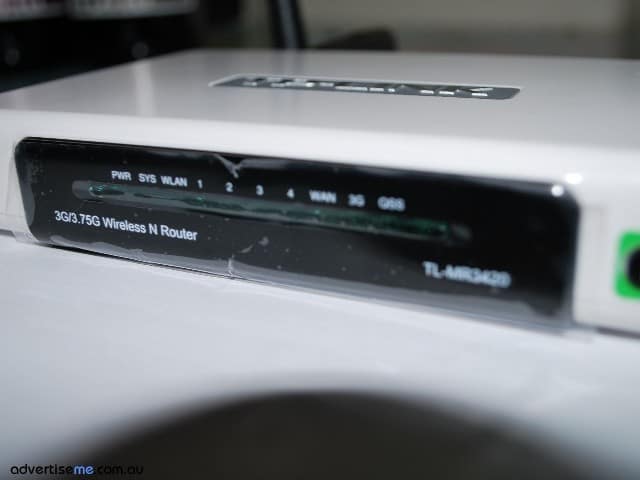
- 3G modem router – there are many brands and manufacturers but the one we used was a TP-LINK 3G/3.75G Wireless N router (Model TL-MR3420)
The first thing to do is setup the network settings on your digital signage player to use DHCP. This means that when it is connected to the network it will obtain a Dynamic IP address. If it’s a new digital signage player, it will most likely already be configured for DHCP but if not then simply change it’s network settings. Once you physically connect the digital signage player to the router via a standard network cable, it will automatically assign an IP address.
Now, before buying a 3G modem router you need to make sure it supports the actual 3G modem you’re planning to use. If it does, then once it’s plugged in the router, it will automatically use the correct modem drivers. If not either change the router or constantly check the manufacturer website to see whether the drivers has been released.
On the 3G modem router, you will need to setup the APN and Dial Number. An example is below:
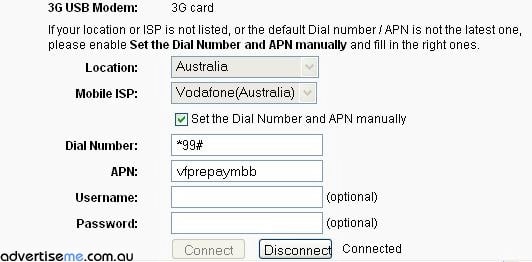
Generally, the 3G Modem router will have preselected ISP settings but for us we spent a few hours trying to figure out why our Vodafone USB 3G modem would not connect to the Internet. After researching and troubleshooting for almost 1 hour, we found the cause of the problem. The 3G Modem router has predefined Mobile ISP settings e.g Vodafone (Australia) configured, but what we discovered was that since we were using a Vodafone Prepaid modem we actually needed to use vfprepaymbb as the APN value rather than using the standard value of vfinternet. After changing that value the router immediately connected to the Internet. That’s a gotcha!! So be careful with this. Once connected you should see something like this:

The best way to test to see if your digital signage player is connected to the network is to simply add a URL to your playlist item and display a website. That’s it, your digital signage player is now connected to the Internet via 3G. One issue that I found is the inability to connect to the digital signage player from the Internet. I was not able to do so because either the ISP has a firewall and is blocking inbound connections or the ISP is using a proxy server for browsing. If someone has figured out a way to overcome this please let us know.


© AdvertiseMe.com.au for Digital Signage Blog, 2010. |
Permalink |
No comment |
Post tags: 3g, 3g Wireless, apn, cabling, Cat5, Correct Modem, Dhcp, Dial Number, Digital Modem, digital signage player, Drivers Modem, Dynamic Ip Address, Focus, Gotcha, Hurdle, Isp Settings, Local Network, Manufacturer Website, Modem Check, Modem Drivers, Modem Router, Modems, Network Cable, Network Interface Card, Network Modem, Network Settings, Sim Slot, Tl, Tp Link, Usb Modem, vodafone, Vodafone Australia, Vodafone Connect, Wireless Network Card
Article Source: http://www.digitalsignageblog.com/2010/10/22/techie-question-how-do-you-setup-a-3g-modem-with-digital-signage/
Visit the Digital Signage Blog
About our Sponsor:

Advertise Me is a privately owned Australian company specialising in all aspects of digital signage solutions.
Our team of highly skilled professionals is able to introduce innovative ways for businesses to communicate with their intended audiences for a variety of purposes including informing, educating, entertaining and selling.
You can expect us to:
- offer the most affordable and cost effective solutions tailored to your specific business needs.
- provide you with concise and accurate information and will ensure that you understand and are comfortable with our proposals.
- strive to make our clients happy and successful.
We have partnered with a number of key reputable organisations and will continue to build further partnerships to deliver the most effective solutions for our customers.


Digital Signage Blog – our thoughts, interesting news and articles, interviews and case studies in the digital signage industry