

Have you ever been in this situation: You installed a screen in the landscape orientation, a few weeks later your client changed their mind and want it installed in portrait mode. What do you do now?
There are a few questions you will need to consider and I’ve listed some below:
1. Does the screen support Portrait? If your using a commercial grade screen then most likely the answer is “Yes” but if you have purchased a residential screen then the answer would be “No”. That is one of the benefits of using a Commercial grade screen.
2. Which way do you rotate the screen? Generally, the logo (Samsung. Panasonic) would be on the left hand side when you rotate the screen vertically.

3. Do I need to change brackets? Most likely you will need to change the bracket. The reason for this is that the bracket that is drilled onto the wall is too long and it will stick out on both sides of the screens when the screen is mounted vertically.
4. Does the content on the screen need to change? Yes, the first thing you need to do is rotate the screen on the Operating System. To do this follow these steps if you’re using Windows 7:
Right click the desktop, select screen properties and change landscape to portrait.
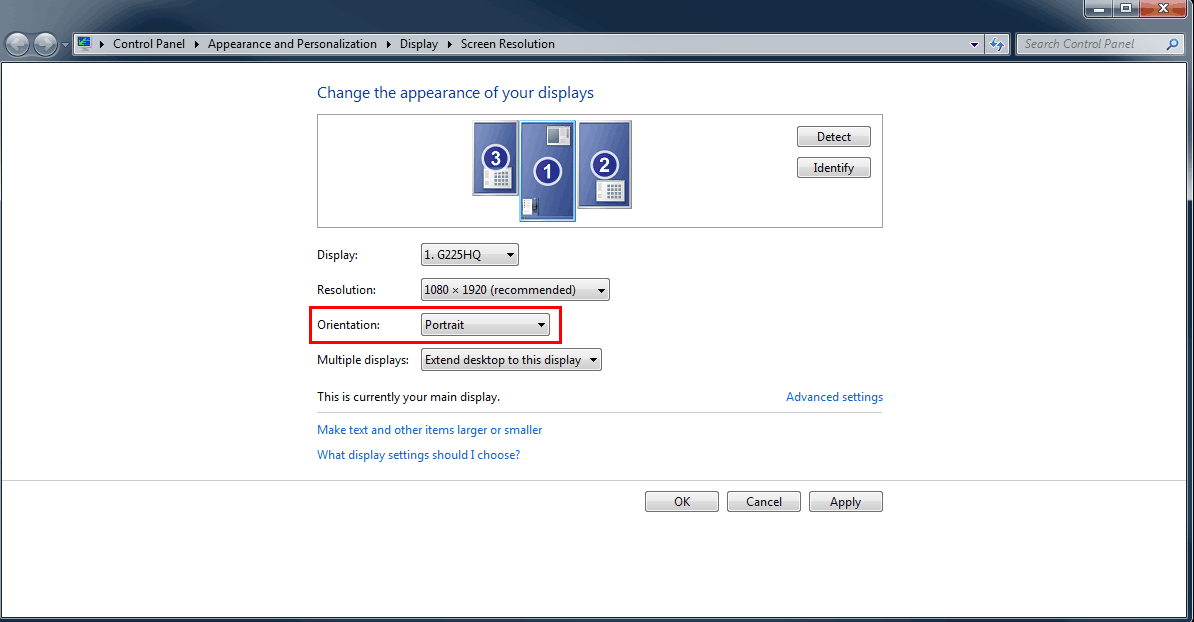
The screen will then be rotated. If you haven’t positioned your screen in portrait then it may feel a bit weird moving the mouse as it will move in the opposite direction.
So now that you’ve changed the Operating System screen orientation, you need to modify your content. You cannot use the existing content because the dimensions are incorrect. So a 1920 x 1080 screen resolution needs to be changed to 1080×1920. The elements in this canvas also needs to be changed.
Overall, there is a fair bit of work that needs to be done to change a screen from landscape to portrait.
Article Source: http://www.digitalsignageblog.com/2013/05/22/techie-question-my-client-wants-their-landscape-screen-changed-to-portrait/
Visit the Digital Signage Blog
About our Sponsor:

Advertise Me is a privately owned Australian company specialising in all aspects of digital signage solutions.
Our team of highly skilled professionals is able to introduce innovative ways for businesses to communicate with their intended audiences for a variety of purposes including informing, educating, entertaining and selling.
You can expect us to:
- offer the most affordable and cost effective solutions tailored to your specific business needs.
- provide you with concise and accurate information and will ensure that you understand and are comfortable with our proposals.
- strive to make our clients happy and successful.
We have partnered with a number of key reputable organisations and will continue to build further partnerships to deliver the most effective solutions for our customers.


Digital Signage Blog – our thoughts, interesting news and articles, interviews and case studies in the digital signage industry